

You know when you do something really embarrassing, so you stuff it deep down inside you to fester, hoping that no one noticed or realized what an absolute dullard you are, but instead of this being relaxing, you end up living with the crushing fear of discovery forever?
This isn’t one of those times. But only for one reason: I’ve decided to broadcast my shame.
Yes, I, a man who has owned a Nintendo Switch for two-and-a-half years, had no idea that you could turn the docked console on with its controllers. And — come a bit closer, that’s right, so you can smell the beans on my breath — you totally can.
And we’re going to show you how.
[Read:Â Nintendo Switch Online is good, but it needs N64 games to be great]
So, how do I turn on a Nintendo Switch with its controllers?
It’s so simple it makes me sick. All you need to do is press the home button.
That’s it.
So, if you’re using a Pro controller, you can turn on the Nintendo Switch using this button:
And if you want to turn on the Nintendo Switch (while docked) using the Joy-Cons? Well, just slam your fingers down on this button:
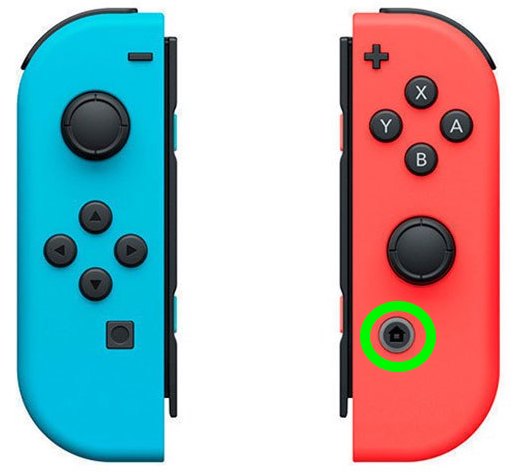
Another simple way of putting the advice is this: press that goddamn home button.
Contemplating failure
Learning this over the weekend blew my (seemingly tiny) mind. I’ve had no issues whatsoever turning on the PS4 or XBox One with a controller, but the Nintendo Switch? For some reason I’m not sure I’ll ever understand, I assumed it wasn’t possible.
This meant every time I was chilling on the sofa, contemplating life, then decided to repress that thought train by playing a bit of Mario Kart, I had to actually move my body to another part of the room and turn on the Nintendo Switch.
I don’t need to tell you what part of the Geneva Convention this violates. Or maybe I do: all of it.
Anyway, this got me thinking about the brain. It’s mildly interesting that although I’m capable of some quite complex actions (the physics of being able to accurately catch a thrown ball for example), I still have a mind incapable of figuring out what button to press to turn something on. After two-and-a-half years of owning it.
We must all encounter this at some point — having a total blindspot over a simple task, although we’re out here living complex lives.
So, I started looking around for some words to define this phenomenon. One option I came across was “fachidot,†a German phrase that means someone who’s knowledgeable about a specific topic, but doesn’t know anything else (literally, a “subject idiot). Still, it’s not quite right.
Another interesting area was dysrationalia. This is a term used to describe people who are academically intelligent, but act in irrational ways. Close, but dysrationalia is more of a broad type of thinking, than a simple blind spot.
The nearest I got was a “brainfart.†This is described by Urban Dictionary as “attempting to remember something very obvious, something that you know you should know.†My “how the fuck do I turn on the Nintendo Switch†experience is in the same ball-park, but isn’t quite there.
What happened to me wasn’t momentarily forgetting something (I did that on Saturday when I couldn’t remember my card PIN for three hours), it was a total lack of awareness and comprehension when using a common item.
In my (admittedly half-assed) research, I found no word or phrase that truly encapsulates the feeling of being a totally functioning person, yet doing something that shows zero common sense.
So, I’m going to throw out a suggestion: blankspaced.
The idea is there’s an empty area where a bit of knowledge or comprehension should be, but — for some reason — isn’t. You know, stuff like getting angry your computer won’t turn on, although it’s not plugged in: you blankspaced. Trying to change your laptop’s volume with a TV remote: a blankspace moment.
Or, when you have no idea you can turn on a Nintendo Switch using the goddamn controller. That, friends, is a blankspace.
For more gear, gadget, and hardware news and reviews, follow Plugged on
Twitter and
Flipboard.
Published June 22, 2020 — 12:30 UTC
Discover more from PressNewsAgency
Subscribe to get the latest posts sent to your email.