

Key takeaways:
- Choosing between Wrike vs monday comes down to project controls versus workflow flexibility. For dependency planning, approvals, and reporting, Wrike has the edge. monday is better for resource planning, automation, flexible workflows, and AI tools.
- PMOs and teams managing several projects will usually get more from Wrike, while monday suits departments that want simpler setup and easier process changes.
- If scheduling rules and approvals shape most of your work, Wrike is the better option. Teams that need configurable workflows and more automation may prefer monday.
 monday |
||
| My rating | 4.07 out of 5 | 4.17 out of 5 |
| Best for | PMOs and complex project work | Teams that want flexible workflows across departments |
| Monthly starting fee | $10/user/mo. | $9/user/mo. |
| Project planning | Better | Good |
| Resource tracking | Good | Better |
| Automation & AI | Good | Better |
| Ease of use | Moderate learning curve | Easier to learn |
| Reporting | Better for custom analysis | Better for portfolio visibility |
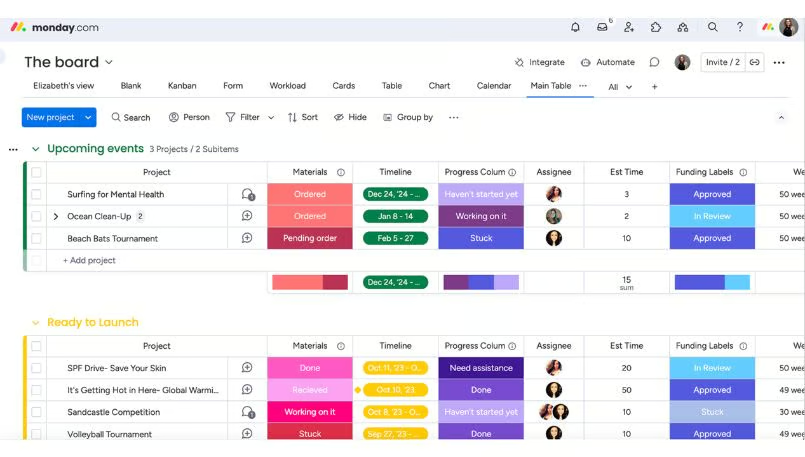
monday.com AI workspace
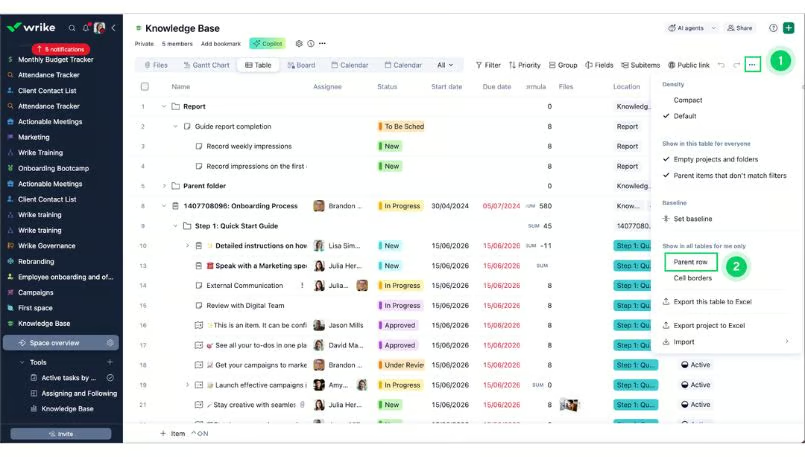
Wrike workspace
How I evaluated Wrike vs monday.com
I tested Wrike and monday to compare how each platform handles common project management workflows and admin tasks. I also reviewed product documentation and consulted recent customer feedback to account for experiences that may not appear during hands-on testing.
Pricing (20%): I compared each platform’s plan costs, included features, and restrictions that could require an upgrade. I also considered how seat requirements, automation limits, and other usage-based costs could affect the total price.
General features (25%): I evaluated the basic capabilities for managing projects, including task management, scheduling, collaboration, and reporting. I also compared how each platform handles recurring project workflows, including automation, approvals, and repeatable processes.
Advanced features (20%): I assessed capabilities for more complex project environments, such as resource management, portfolio management, advanced automation, and AI. I considered whether these features support more specialized requirements or mainly expand existing core functions.
Ease of use (10%): I tested how easy it was to create projects, configure workflows, and complete tasks in each platform. I also considered the learning curve for new users and admin setup.
Support (10%): I reviewed the customer support channels and self-service resources available across each provider’s plans. I also considered recent customer feedback about response speed and access to technical assistance.
Expert score (15%): I assigned my expert score based on my hands-on experience with each platform and how well its capabilities address project management requirements. I also considered the product’s overall value for its intended users and the limitations that could affect a purchasing decision.
| Why you can trust TechRepublic |
| I’ve spent the past four years testing nearly 20 project management platforms, and some of them have become part of my workflow. Writing dozens of PM software guides for businesses of all sizes taught me what individuals and teams need from these tools beyond the marketing pitch. I also build custom scoring rubrics for each review to ensure fairness and that selected platforms get evaluated on the same criteria.
|
 Marianne Sison
Pricing
Winner: monday.com. It offers the lower-cost option for growing teams once they need workload management and higher automation limits, while Wrike can cost less for teams of 15 or fewer that opt to remain on its $10-per-user Team plan.
Wrike can be cheaper for small teams, but teams with more than 15 users must move to Business at $25 per user. A 25-person department would therefore pay more for Wrike Business than monday Pro at $19 per seat, which also includes workload views and up to 25,000 automation actions per month.
When comparing fees, it’s worth looking at both providers’ lowest-priced plan that supports the team size and required features.
| monday |
 Wrike |
|||
| Five-person project team | Gantt planning, dashboards, integrations, light automation | Standard: about $80/month* | Team: $50/month | Wrike |
| 25-person department | Workload management, time tracking, higher automation volume | Pro: about $505/month* | Business: $625/month | monday |
| 100-person multi-department deployment | Portfolio management, resource planning, enterprise permissions | Enterprise: Custom | Pinnacle: Custom | Compare quotes |
| *Estimated annual billing cost plus monday’s minimum required AI-credit purchase for eligible customers under its current pricing model. | ||||
AI can also affect the total subscription cost because monday and Wrike charge for usage differently. Under monday’s current model, eligible new customers pay for seats plus a minimum pool of AI credits, while Wrike includes AI Essentials in paid plans and gives AI Elite a separate monthly usage allowance.
If you expect frequent use of AI workflows or agents, make sure to include estimated AI consumption in the total cost comparison.
Project planning & task management
Winner: Wrike. Both platforms can handle projects with dependencies, deadlines, milestones, and Gantt charts. Wrike works better when the same work affects several projects or when one delay can disrupt the rest of the schedule. monday can handle those scenarios too, but linking dependencies across separate projects requires its Enterprise plan.
| Wrike |
monday |
||
| Task hierarchy | Tasks, nested subtasks, projects, subprojects, folders, and portfolios | Tasks with up to four subitem levels; project boards can connect to portfolios | Wrike for projects with several work branches |
| Work across departments | The same task can appear in multiple projects or spaces | Connect Boards and Mirror Columns link work across boards | Wrike when multiple teams share one deliverable |
| Dependencies | Task dependencies with schedule adjustments | Item and subitem dependencies with date shifting | Tie for task-to-task dependency tracking |
| Gantt and critical path | Gantt chart with critical path analysis on qualifying plans | Gantt chart with dependency views. | Wrike for schedule-risk analysis |
When one deliverable affects several projects, Wrike allows teams to keep working from the same underlying task even when it appears in different projects. monday connects work across separate boards, which can require more setup when several departments depend on the same deliverable.
Resource management
Winner: monday. It offers a more complete resource-planning workflow because managers can track capacity, match people to work based on role or skill, and compare planned effort with actual work across projects. Wrike is better suited to balancing current workloads and forecasting where future demand may exceed available capacity.
| Workload visibility | Shows individual workload across projects and flags over-allocation | Shows over- and under-capacity based on assignments and work schedules | Tie for identifying overload |
| Capacity planning | Uses workload and booking data to compare future demand with available hours | Compares planned effort with available capacity across projects | monday for advance resource planning |
| Resource matching | Supports role-based planning and future demand analysis | Uses a Resource Directory to organize people by role, skill, and other attributes | monday for assigning the right person to upcoming work |
| Cross-project allocation | Consolidates workload across multiple projects and supports reassignment | Centralizes allocation across projects and compares planned effort with utilization | Tie for multi-project staffing |
| Demand forecasting | Compares upcoming resource demand with available capacity | Uses planned effort and resource capacity to anticipate staffing needs | Wrike for future workload forecasting |
When it comes to usage costs, Wrike is easier to budget because basic AI features are included on paid plans, and AI Elite uses a monthly pool of actions. monday deducts shared AI credits at different rates depending on the feature and request complexity, so teams that rely heavily on AI workflows or agents may need to strictly track credit consumption.
AI & agent assistance
Winner: monday. monday’s AI work platform does more than generate text or summarize work. Sidekick answers questions and update workspace data, while AI workflows and configurable agents carry out multi-step actions across boards. Although Wrike offers similar features, it is more focused on project analysis, especially identifying risk based on project activity.
| Generative assistance | Creates content, forms, or automation rules | Sidekick can answer questions, create boards, and update workspace data | monday for AI that can respond and modify work |
| Workflow automation | AI Agents can classify requests, validate intake, and flag risks | AI workflows and agents can run multi-step processes across boards and connected tools | monday for multi-step workflow automation |
| Project intelligence | Predicts risk based on deadlines, complexity, and historical data | Provides AI risk insights and AI-assisted resource assignment | Wrike for predictive risk analysis |
| Usage model | Included on paid plans; AI Elite uses a pooled monthly action allowance | Draws from a shared credit pool, with usage varying by feature and request complexity | Wrike for more predictable AI usage costs |
When it comes to usage costs, Wrike is easier to budget because basic AI features are included on paid plans, and AI Elite uses a monthly pool of actions. monday deducts shared AI credits at different rates depending on the feature and request complexity, so teams that rely heavily on AI workflows or agents may need to strictly track credit consumption.
Reporting & portfolio management
Winner: monday. Wrike provides more reporting tools for custom analysis of resources, budgets, or performance trends, but monday consolidates project health, risks, milestones, and planned versus spent effort in one portfolio view. Its portfolio tools also use AI to surface potential risks and update project details from the portfolio view.
| Which projects are at risk? | Surfaces blockers, overdue work, and slipped milestones | Highlights potential risks across connected projects | monday for identifying at-risk projects across a portfolio |
| Where are resources constrained? | Reports combine workload, effort, time, and capacity data | Portfolio views compare planned and spent effort across projects | Wrike for capacity and utilization analysis |
| Which deadlines depend on delayed work? | Reports and dashboards track milestones, dependencies, and overdue tasks | Portfolio views combine status, milestones, and connected project data | Wrike for tracing deadline impact across dependent work |
| Where should management intervene? | Custom dashboards help leaders investigate resource, budget, and performance issues | Portfolio health views and AI risk insights surface projects with elevated risk or missed milestones | monday for deciding where leadership should intervene |
For leadership teams reviewing several projects at once, monday makes it easier to compare project health from one portfolio view. Managers can quickly spot projects with elevated risk, missed milestones, or resource pressure. Wrike is the better choice when managers need custom dashboards and reports to examine budget overruns, resource constraints, or schedule delays in more detail.
Ease of use & administration
Winner: monday. Between monday.com vs Wrike, employees usually learn monday faster because routine work centers on boards, groups, items, and status updates. monday administrators can also control access at several levels, while Wrike requires users to manage more concepts such as spaces, folders, projects, workflows, and access roles.
| Employee use | Users work across spaces, projects, folders, and tasks | Users work with boards, groups, items, and status updates | monday for faster onboarding |
| Workflow admin | Control statuses, transitions, approvals, and automatic assignments | Manage reusable workflows, automations, and board permissions | Wrike for more controlled workflow progression |
| Permission management | User types and access roles control actions across spaces and projects | Permissions can be applied at the account, workspace, board, and column level | monday for more granular access control |
| Expansion across departments | Different spaces can maintain separate workflows and access rules | Workspaces let departments maintain separate boards while account admins retain broader controls | monday for managing multiple departmental workspaces |
As more departments adopt the platform, monday is easier to administer because teams can manage their own boards and workspaces while admins retain account-level controls. Wrike lets users set status transitions, approval workflows, and assignment rules in more detail, but maintaining those settings across departments requires more setup.
Security & enterprise controls
Winner: Wrike. Its access controls better suit teams that need to restrict who can view, edit, or share specific project information through custom user types, access roles, locked spaces, and selective sharing. For IT administration, monday has an advantage in identity and account access through SAML SSO, SCIM provisioning, session controls, and network restrictions.
| Authentication | SAML SSO, 2FA, and enterprise identity controls | SAML SSO, SCIM provisioning, and enterprise identity controls | Tie for centralized authentication |
| Access controls | Custom user types, access roles, locked spaces, and selective sharing | Account, workspace, board, and column permissions | Wrike for controlling access to sensitive project data |
| Audit capabilities | Audit reports and API-accessible activity logs | Audit log and Audit Log API | Tie for audit and activity monitoring |
| Data residency | US and EU data centers with enterprise security options | US, EU, and APAC data regions | monday for regional hosting choice |
| Admin controls | Granular permissions across users, spaces, and shared items | SCIM, tenant restrictions, session controls, and account-level security settings | monday for identity and account-level administration |
For organizations that need stricter access rules around individual projects, spaces, or shared items, Wrike has the advantage. monday is better suited to companies that need to manage user identity, sessions, and account-wide access across departments.
Wrike vs monday alternatives
Wrike and monday cover a wide range of project needs, but other project management software may suit teams that need lower-cost feature access, spreadsheet-based work management, or native billing tools.
| More project features at a lower starting price | ClickUp | Includes Gantt charts, native time tracking, and unlimited integrations at $7 per user per month. Work can be organized into Spaces, Folders, Lists, and tasks across departments. |
| Spreadsheet-based portfolio management | Smartsheet | Combines grid-based work management with formulas, reports, automations, and portfolio tools. Control Center provides standardized project creation and portfolio reporting. |
| Project management with time tracking and billing | Zoho Projects | Combines task planning with timesheets, workload reports, issue tracking, invoices, and expenses |
ClickUp is the affordable Wrike and monday alternative when teams want a large feature set at a lower per-user price, while Smartsheet suits organizations already comfortable managing work through grids and formulas. Zoho Projects is worth considering when project delivery also depends on tracking billable hours, expenses, or client invoices.
Wrike vs monday: Which platform suits your type of work?
The better choice depends on how your team manages projects and how much control you need over workflows. monday works well for cross-functional teams that want configurable processes and easier adoption, while Wrike is better suited to projects with more dependencies, approvals, and formal controls.
Wrike is the better choice when projects depend on scheduling, approvals, and defined access rules for shared work. However, teams that operate across departments and need more flexible workflows, resource planning, and automation will generally get more from monday.
FAQs
What is the main difference between Wrike and monday?
The main difference is how each platform manages work. Wrike focuses more on managing dependencies, approvals, and work that spans several projects, while monday offers more flexibility to configure workflows, automate processes, and coordinate work across departments.
Is Wrike better than monday for project management?
Wrike is better when a project manager needs to coordinate several schedules, approvals, or linked projects from one system. monday is usually easier to adapt across departments, especially when teams need to change workflows or automate routine work frequently.
Is Wrike or monday better for large businesses?
For large businesses, the deciding factor is usually administration rather than headcount. monday works well across departments through workspaces, permissions, automation, and resource planning, while Wrike suits organizations that need standardized workflows and strict access rules across projects.
Discover more from PressNewsAgency
Subscribe to get the latest posts sent to your email.